Conebo 3D Sound Walker
Conebo 3D Sound Walker
See, hear and measure Dolby Atmos® in your home theater.
Release December 2026 · Free to use · Get notified
Listening Tests
Place, move and walk sounds through your room with four interactive tests.
Reflections & Bleeds
Detect early reflections and bleeding speakers directly in Conebo, with automatic rating.
Conebo Driver
Measure every Atmos speaker and speaker group directly in REW with our ASIO compatible driver.
Timing Control
Detect buffer underruns during measurement, even when you can’t hear them.
Define your room
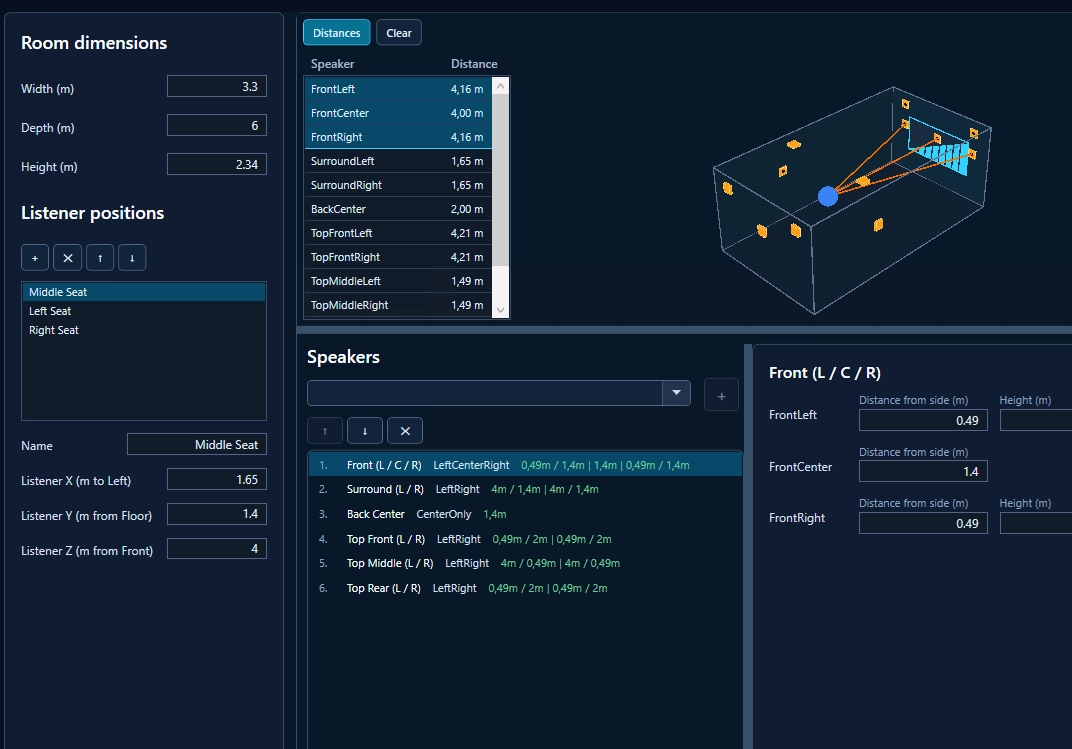
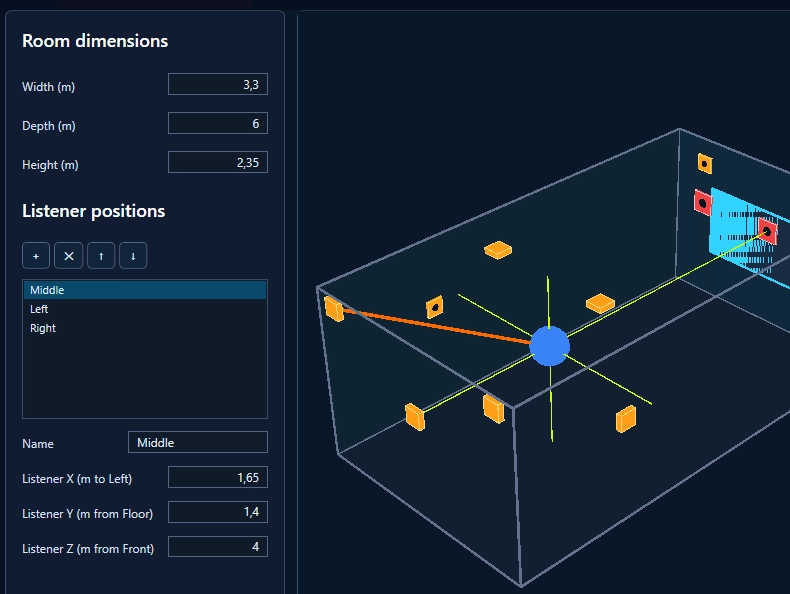
Start by setting up your home theater in Conebo. Enter your room size, listening positions and speakers. Choose from all Dolby Atmos® layouts offered by current AV receivers and set each speaker’s position relative to its wall. Then play a test sound on any speaker to check it right away.
- Room dimensions and listening positions
- All common Dolby Atmos® speaker layouts
- Speaker positions relative to each wall
- Test sound on every speaker
- Live display of active Atmos objects
Hear your room
Static Objects
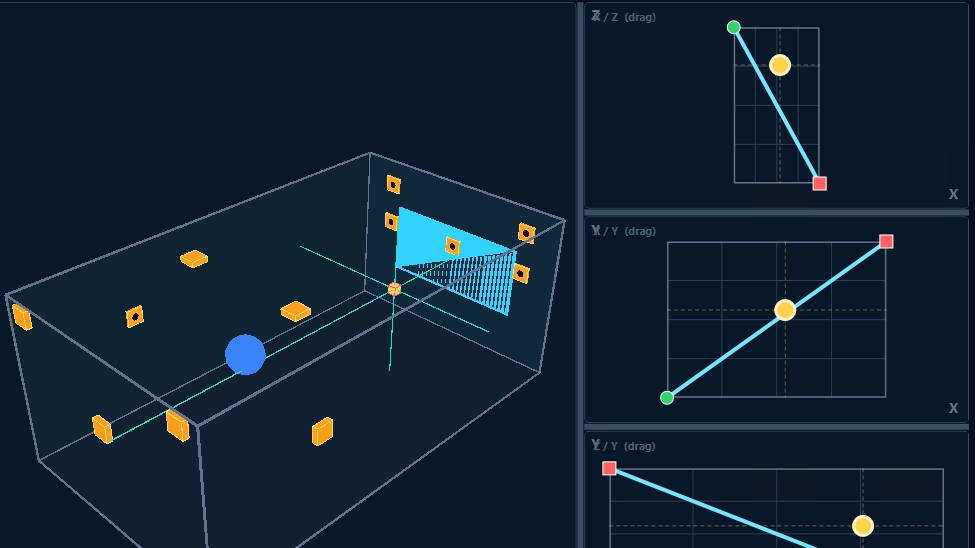
Place a sound at any position in your room. Drag the object in the side, top and front views and see its exact position live in the 3D view. You hear right away whether the sound comes from exactly where you placed it.
Moving Objects
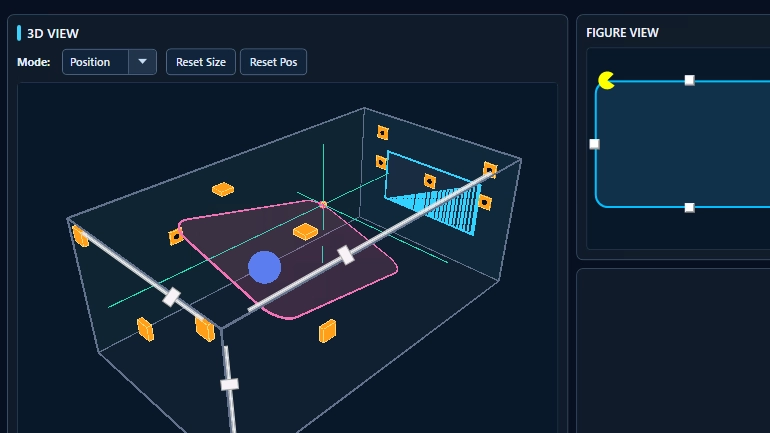
Send a sound on a path through your room. Set the start and end points by dragging them in the side, top and front views, and follow the moving object live in the 3D view. You hear right away whether the sound moves smoothly from speaker to speaker.
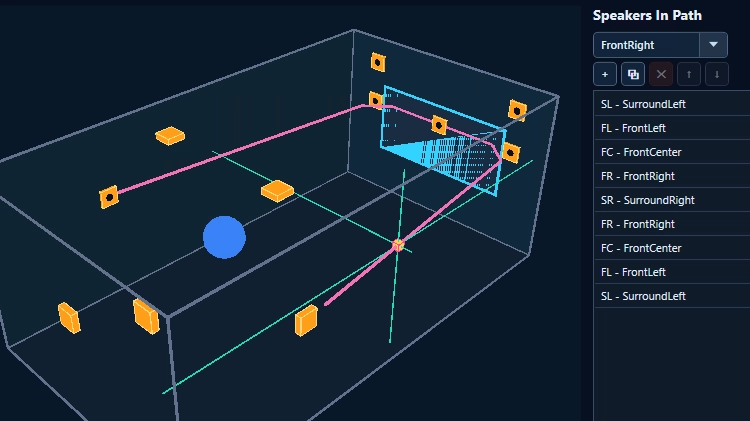
Speaker Walk
Walk a sound from speaker to speaker. Build your own path from any speakers in your room, add or remove stops and change their order. The path appears live in the 3D view, so you hear right away whether every speaker plays at the right moment and in the right place.
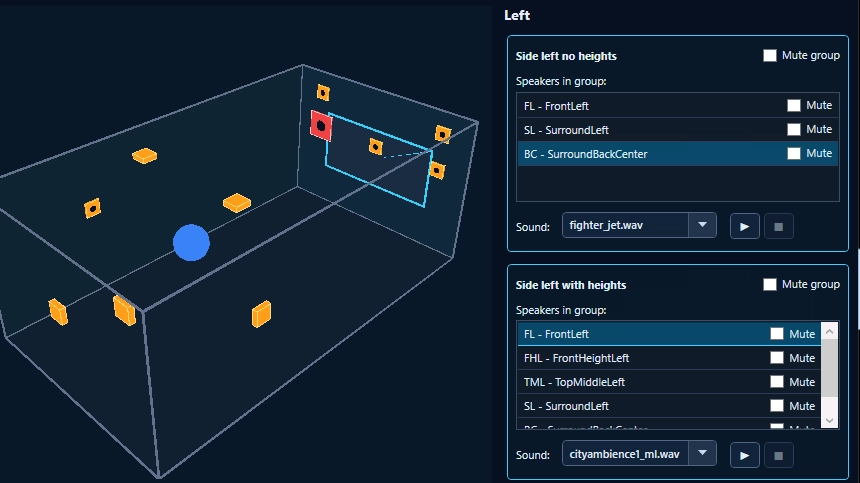
Speaker Groups Tests
Play entire speaker groups at once, such as front, surround or height speakers. Select a group and see in the 3D view which speakers are active. You hear right away whether the group plays together as it should and whether the sound reaches you evenly from all sides.
Conebo Driver
Conebo Driver connects REW with the tester.
In the tester, you define which speakers and speaker groups REW should offer for measurement, then load this configuration into the driver. REW shows exactly these outputs, so you can measure single speakers or entire groups in one run. Any measurement software that supports ASIO drivers works the same way.
During each measurement, the driver reports monitoring data back to the tester. If a buffer underrun occurs, which can sometimes appear as crackling, the tester shows a “Check Timing” warning, even if you can’t hear it. Simply repeat the measurement. Once configured, the driver also runs without the tester, but then you won’t get this warning.
Conebo Driver is a separate paid add-on.
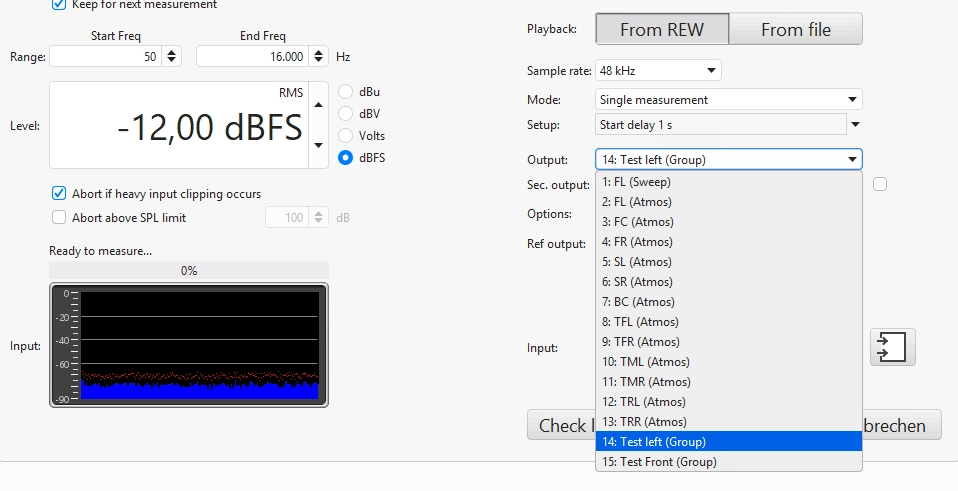
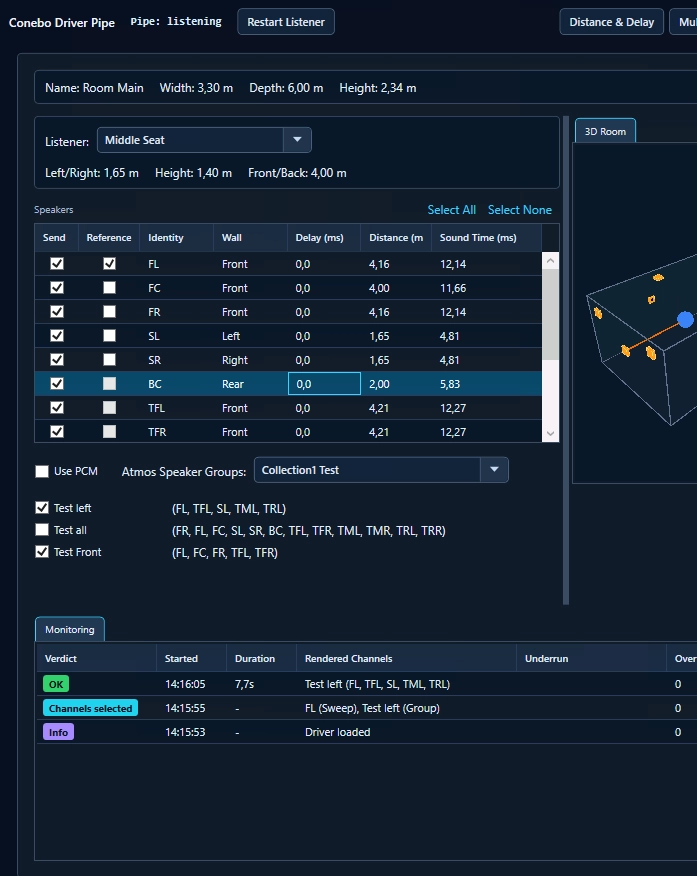
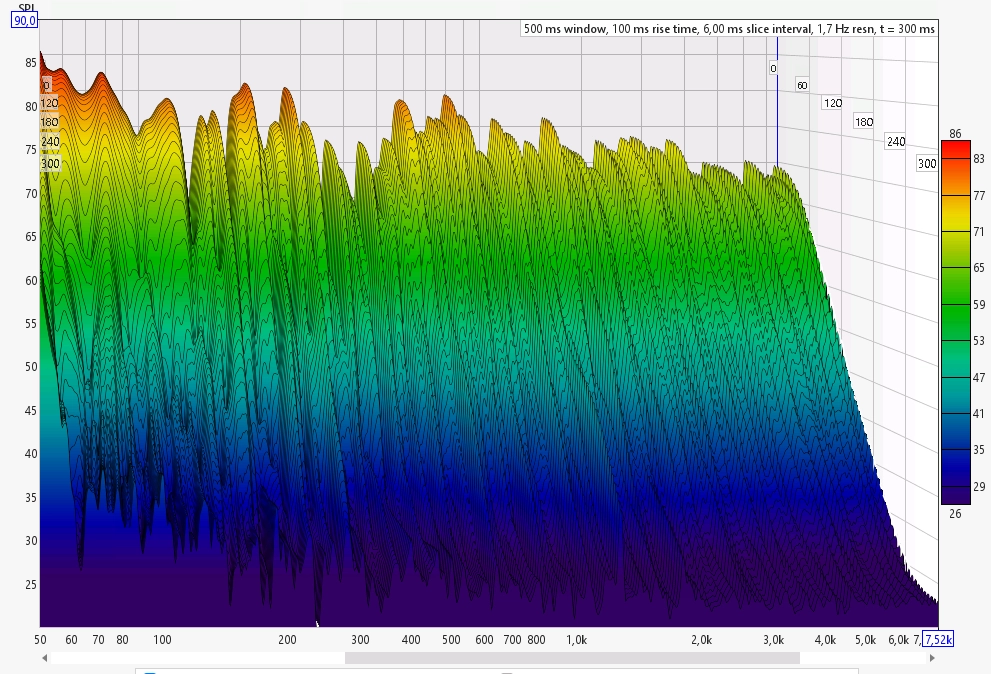
The full power of REW, for every Atmos speaker
Height speakers and speaker groups are measured just like any other channel. Frequency response, waterfall, RT60, impulse and all other REW analyses are available for your complete Dolby Atmos® setup.
Find reflections and bleeding speakers
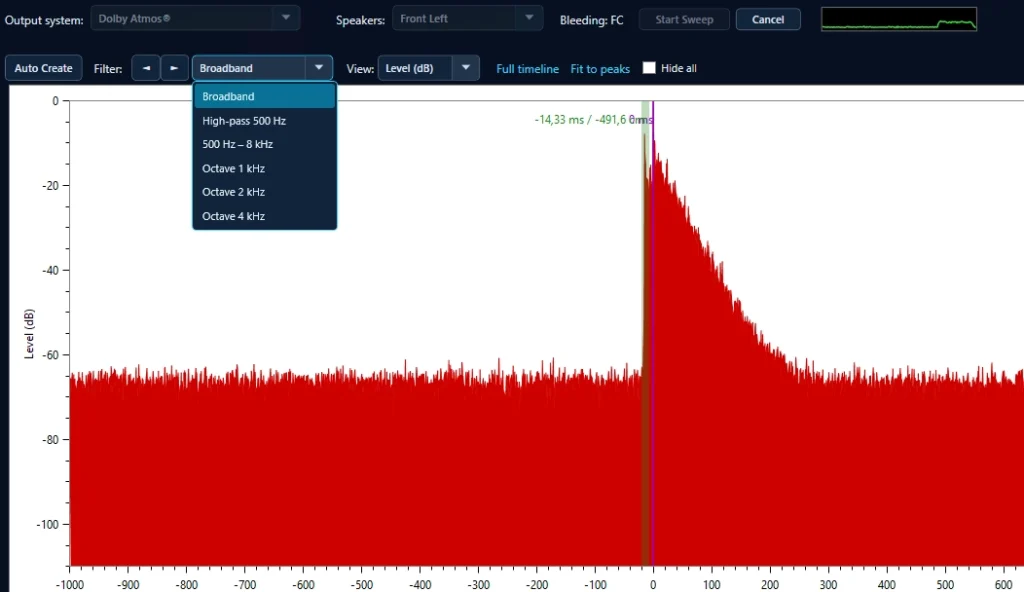
Measure directly in Conebo, without REW. The classic impulse response shows the arrival of the direct sound and everything that follows: early reflections from walls and ceiling, and speakers that play along when another speaker is addressed. In our tests, Conebo’s impulse timing results match REW.
Auto Create analyzes the measurement and marks suspicious peaks with their delay in milliseconds and their level in dB. Frequency filters (broadband, high-pass, octave bands) show in which range a reflection or bleed occurs.
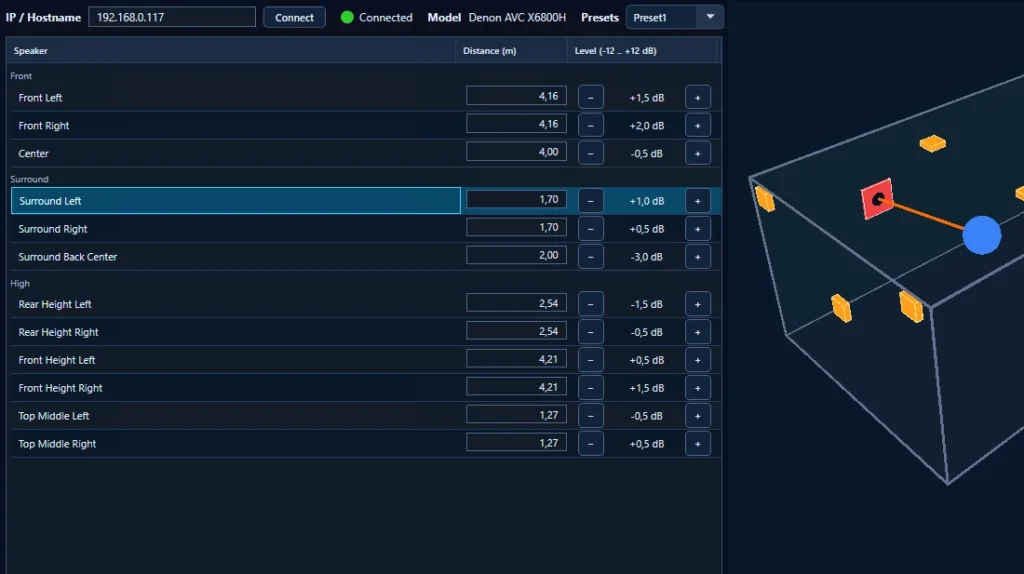
Receiver Control will be available in version 1.1 (Q1 2027). The current version includes a demo.
Control your AV receiver
Connect to your AV receiver over the network and adjust the distance and level of every speaker directly in Conebo. Change a value, play a test sound and hear the result right away, without switching between receiver menu and measurement.
Save your settings as presets and restore them at any time. The selected speaker is highlighted in the 3D view, so you always know which channel you are adjusting.
- Connect over the network with IP or hostname
- Distance and level for every speaker
- Level adjustable from −12 to +12 dB
- Presets to save and restore settings
- Selected speaker highlighted in the 3D view
Roadmap
Version 1.0 is the start. These features are planned next.
Version 1.0 (Dec 2026)
Room definition, four listening tests, Reflections & Bleeds and the Conebo Driver for REW. Free to use, driver as paid add-on.
Version 1.1 (Q1 2027)
Receiver Control for distances and levels. Bleeding speakers can be isolated, so only the selected speaker plays.
Version 1.2 (Q2 2027)
Extended REW integration. With REW 5.4, Conebo starts measurements directly, without operating REW yourself.
Version 1.3 (Q4 2027)
Subwoofer calibration, the first feature with AI support.
Frequently Asked Questions
What is the Conebo 3D Sound Walker?
A tool to test, measure and visualize Dolby Atmos setups in your home theater. Move sounds through your room, measure with REW and, from version 1.1, control your AV receiver.
How much does it cost?
The Conebo 3D Sound Walker will be freeware. Only the ASIO compatible Conebo Driver for REW will be a separate paid add-on.
When will it be released?
Version 1.0 is planned for December 2026. Sign up below and we’ll send you one email when it’s available.
Do I need REW?
No. Features like moving objects, the speaker walk and the detection of early reflections work on their own. Receiver control follows in version 1.1. REW or a comparable tool is only needed for measurements via the Conebo Driver.
What do I need to run the Conebo 3D Sound Walker?
A Windows PC with Dolby Access, connected by HDMI to a Dolby Atmos® capable AV receiver. REW or a comparable measurement tool is only needed for measurements via the Conebo Driver. Conebo runs only on x64 Windows, for example Windows 11 .
Which AV receivers work with Conebo?
The Conebo tests and measuring with the ASIO compatible driver work with all AV receivers. Receiver Control will be available for Denon and Yamaha. More brands will follow. (Receiver control is coming with version 1.1)
How reliable is the Conebo Driver?
The driver is fully unit tested and was verified in extensive functional test series across four output paths, including PCM and Dolby Atmos. Timing deviation across all paths is about 0.0058 ms (2 mm). The driver detects buffer underruns, the cause of crackling, even when you can’t hear them, and reports them as a warning to the tester. It is built on the Steinberg ASIO SDK under license.
Can only REW be connected?
No. The Conebo Driver is the bridge between your measurement software and the Conebo 3D Sound Walker. Any measurement software that supports ASIO drivers can be connected through it.
Get notified
The Conebo 3D Sound Walker will be freeware. We’ll send one email when the release is available.
Release planned: December 2026
Dolby, Dolby Atmos and the double-D symbol are registered trademarks of Dolby Laboratories Licensing Corporation. ASIO is a trademark of Steinberg Media Technologies GmbH, registered in Europe and other countries. REW (Room EQ Wizard) is software by John Mulcahy. Denon is a trademark of its respective owner. Windows is a trademark of the Microsoft group of companies. All other product and company names are trademarks of their respective owners. Conebo is not affiliated with, endorsed or sponsored by them.